
Broker configuration
Artemis lets you change a running broker's address settings, security settings and diverts over its management API, and it keeps those changes across a restart. That is useful and it is a trap: nothing in the broker records that the change happened, so the running broker and the broker.xml it will be deployed from next silently disagree.
This page is about the feature that closes that gap. A cluster gets a declaration — what it should run — and Studio measures every live node against it, applies it where you ask, and tells you in words when a node has drifted.
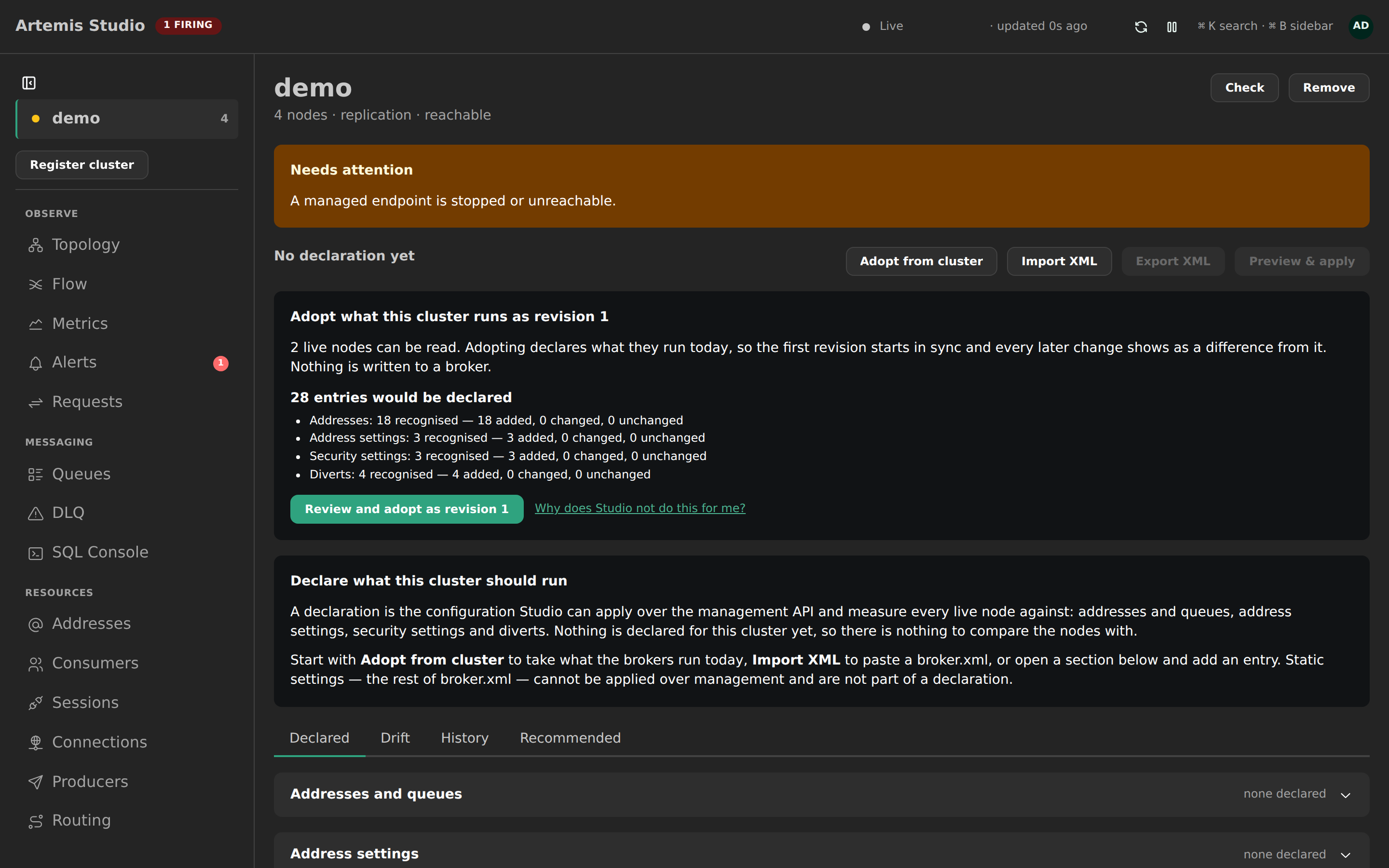
What a declaration is
Four sections, one document per cluster, versioned on every save:
| Section | What an apply does with it |
|---|---|
| Addresses and queues | Creates what is missing. Never deletes. A queue that exists with a different configuration is reported, not changed — edit it from the Queues view. |
| Address settings | Per match: limits, policies, dead-letter and expiry addresses, redelivery. Applying replaces the broker's whole entry for that match. |
| Security settings | Per match: which roles may send, consume, create and manage. |
| Diverts | Created where missing; a changed one is a delete and a create. |
The rest of broker.xml — global-max-size, <ha-policy>, acceptors and the like — cannot be applied over the management API on any Artemis version. Importing a file that has them lists each one as not applied; nothing is stored for them and nothing pretends otherwise.
Two ways to apply it
The mode is set per cluster in the declaration header, and both actions are always visible:
- Managed by Studio. Review & apply writes the declaration to every live node over the management API. The change is durable across restarts, and the next drift evaluation shows the nodes in sync.
- Managed outside Studio. Copy broker.xml fragment renders the declaration as the four sections of a
<core>element for your own configuration management. Apply is disabled and says why. Drift is still evaluated, so you learn when your deployment matches.
Studio never writes broker.xml and never calls reloadConfigurationFile — the reload re-reads the whole file from the broker's disk, including edits Studio has never seen, which is exactly the kind of action that cannot be previewed.
Getting a first declaration
A cluster with live nodes and nothing declared opens on an offer: Adopt what this cluster runs as revision 1, with the counts it would declare per section and any disagreement between nodes named before you open anything. It is a read — the same batched read the drift pass makes — and it saves nothing. Pressing Review and adopt as revision 1 opens the ordinary adoption preview, where the counts appear again beside the confirmation.
Studio never adopts on its own. An adoption declares that whatever the brokers happen to be running right now is intended, including a setting someone changed by hand an hour ago and has not finished thinking about. Only an operator can say that, which is why drift stays advisory until one does (ADR-0067 D8) and why the offer is a suggestion rather than a default.
Three ways in, from the Configuration view:
Adopt from cluster reads every live node and builds a declaration from what they run. Every address-setting match is seeded with the full entry the broker reports, so the first apply changes nothing. Where nodes disagree, both values are listed and you choose.
Import XML: paste a
broker.xmlor a fragment — bare<address-setting>and<security-setting>elements are fine. The preview lists what was recognised (per section, added / changed / unchanged), what is not applied, and any errors with the element named — an unresolved${…}placeholder is an error, not a value. By default the paste is merged into what is already declared: pasted entries add to or update their counterparts, and on an address setting the pasted keys win while the other declared keys stay. Replace makes the paste the whole declaration.The capability ledger on a cluster's setup and settings pages uses the same door. Where a "needs setup" snippet is an address or security setting — slow-consumer detection, the notifications permission, the management message-size limit — the row says so and offers Declare it in Configuration, which opens the import preview on that snippet. The static half of such a snippet (a
<broker-plugins>block) is listed as not applied and still needsbroker.xml.Add an entry in any section. The editors validate against a catalogue of every address-setting key the broker accepts: an unknown key is refused rather than becoming a silent no-op on the broker. Every key carries an info control with what it governs and an example value, and the long tail behind Other keys has a finder.
One thing the broker cannot tell Studio: the view and edit permission types of a security setting are accepted over management but never reported back (measured on 2.44). They are sent, left out of the plan, the verification and the drift check, and the editor says so — confirm those two in the broker's own configuration.
Every save is a new revision. Two operators editing at once do not overwrite each other: a save names the revision it was made on and is refused if that moved.
Closing the capability gaps
Some of what the capability ledger reports as missing is not static configuration at all: it is an address setting or a security setting the management API accepts at runtime. The Recommended tab turns those into a declaration you can apply, instead of a snippet you have to go and paste (ADR-0068).
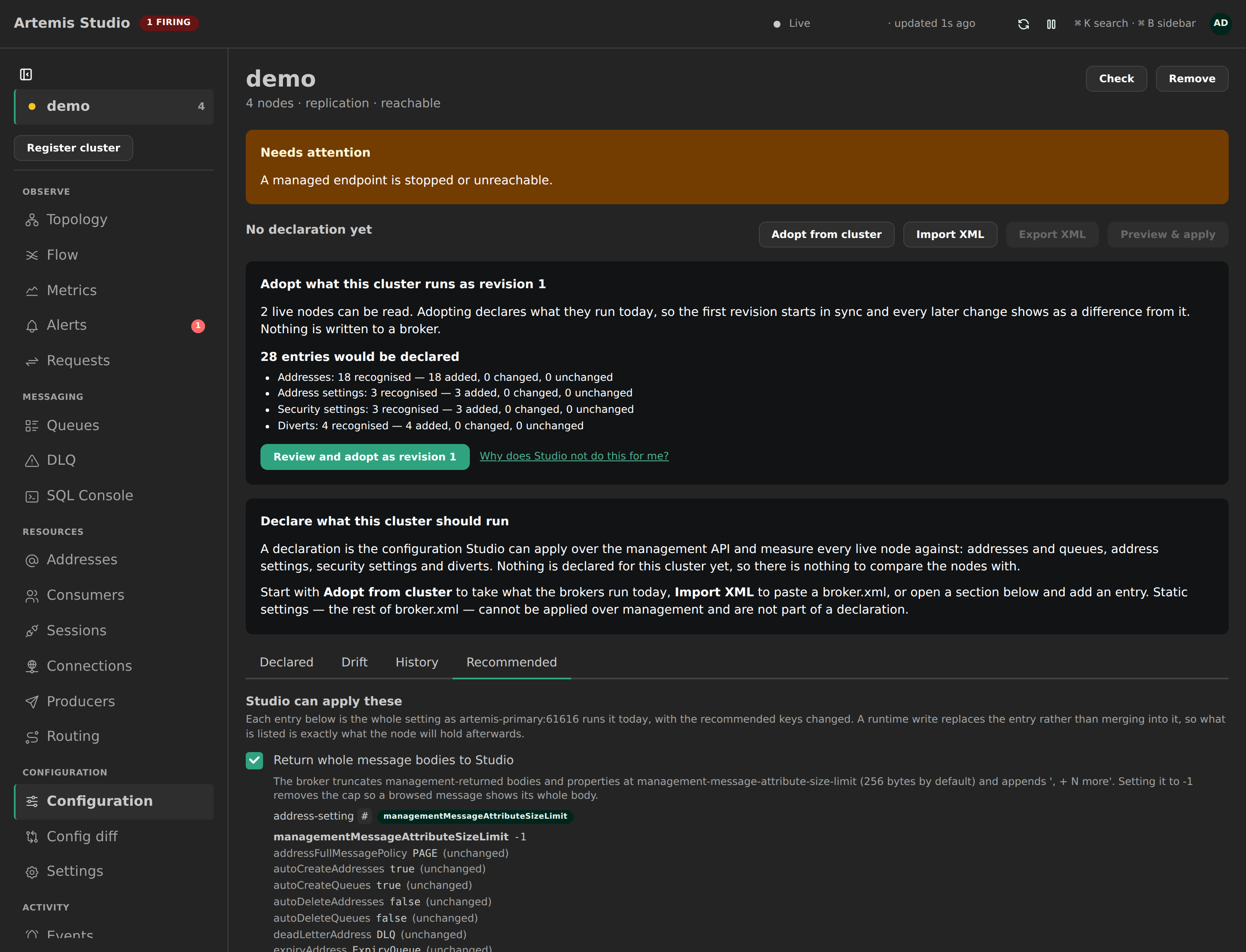
Three are appliable today — returning whole message bodies to Studio (management-message-attribute-size-limit), slow-consumer detection, and the activemq.notifications permission. Each is shown as the whole entry the node runs right now with the recommended keys changed on top, because a runtime write replaces the entry rather than merging into it: what the screen lists is exactly what the node will hold afterwards. Recommended roles for a security setting are read from the broker and editable before you declare; a block naming no role is refused, since it applies cleanly and grants nobody anything.
The rest — the notification plugin, an acceptor, the management security setting — have no management operation behind them and never will. They are named with their broker.xml and the reason, not omitted.
Declaring saves an ordinary revision with source RECOMMENDED, so the audit trail says where it came from, and lands you on the plan. Nothing reaches a broker until you confirm that apply like any other. A recommendation disappears once the probe can read its effect back, which is why only the three above are offered: a recommendation Studio cannot observe as done would never go away.
Registering a cluster previews the same panel on a passing connection check, and takes you to it once the cluster exists.
One screen
Configuration is a single screen: every declared item on its own row, with what it should be, what each live node actually runs — in sync on 2/2, differs on broker-2, missing on broker-1 — and the keys that differ, declared → observed, underneath. A status bar across the top states where the declaration has got to (Revision 4 — applied to 0 of 2 live nodes), when the nodes were last evaluated and on what cadence, and carries the two actions that change those numbers: Evaluate now and Review & apply.
That status bar is what a save answers to. Saving an edit writes a revision and nothing else; the screen the editor returns to says so, with the review one click away. A Nodes panel below the rows holds what no row can carry: each node's state, why an agreeing node agrees, resources the declaration does not mention, and a node that could not be read.
Review and apply
The apply flow is Plan → Confirm → Result in a drawer over the rows it changes, and it is built so it cannot take a whole cluster down at once.
Plan. A dry run reads every targeted node — at most two batched requests per node, never one per item — and computes, per node, the ordered steps whose observed state differs from the declaration. A step whose read-back already matches is already as declared and issues no write. Order within a node: addresses → queues → address settings → security settings → diverts, removals after additions.
Every step reads as a diff: one row per key, before → after, the keys that move first and the keys the write also carries — because a management write replaces the whole entry — kept underneath, dimmed. Replace semantics are therefore visible rather than inferred, and a key you did not declare that will change anyway is a High hazard named unintended key change. A summary bar stays on screen while you scroll the steps: how many writes, on how many nodes, which one goes first, and what is still unacknowledged. Per-node sections collapse on a large cluster; the canary and any node that failed are always open. Chips filter the view by section or key — the counts and the step numbers stay the plan's own.
One item at a time. A row's Apply this opens the same drawer narrowed to that item — the address with its queues, one address setting, one security setting, one divert — on every targeted node. Everything else the cluster has pending stays pending, and the plan hash the confirmation covers is the hash of the narrowed plan, so what you confirm is exactly what runs (ADR-0087).
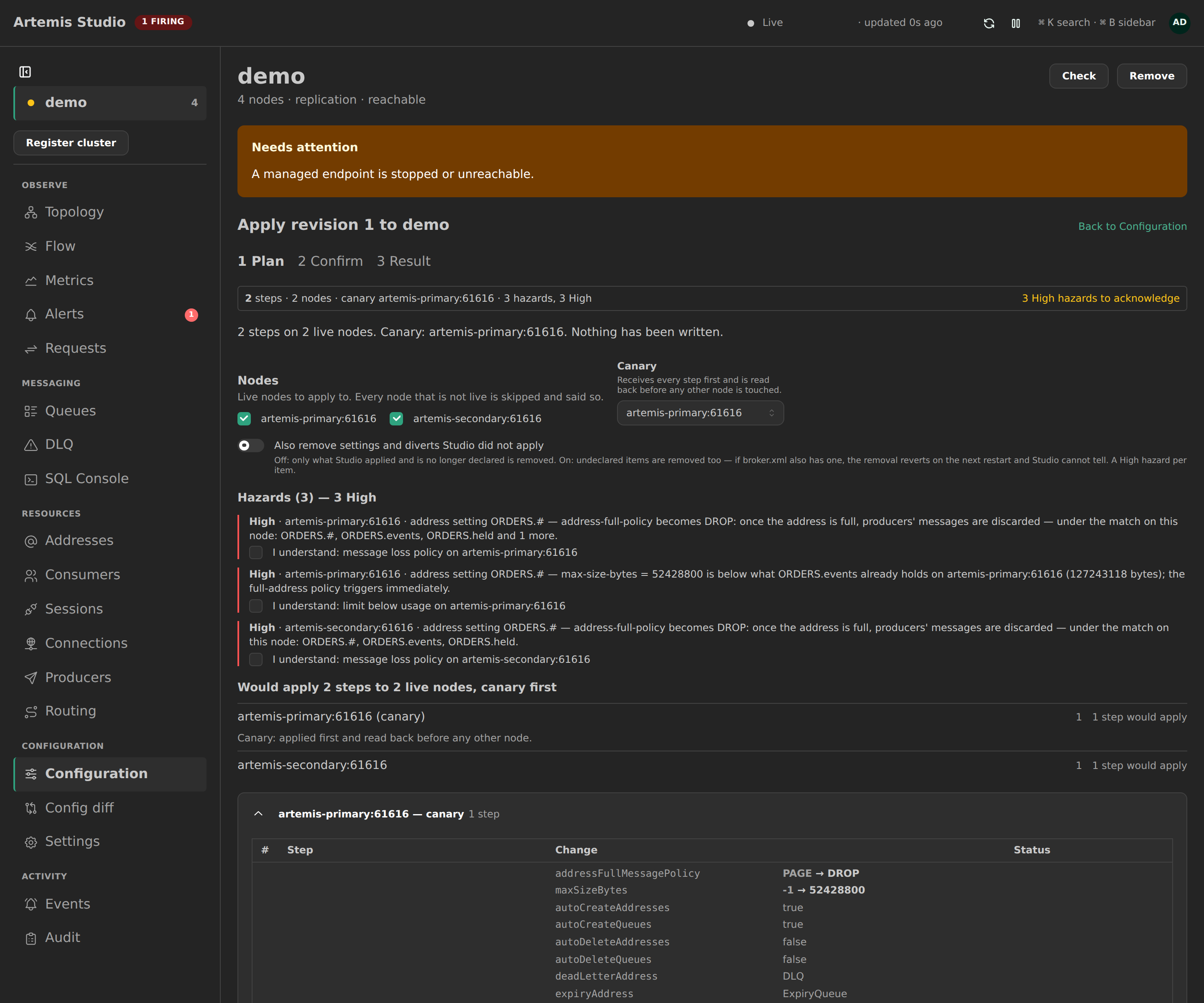
Hazards are classified before any write. The High ones must each be acknowledged, by id, on the plan:
| Hazard | When |
|---|---|
| Unintended key change | replace semantics reset a key the declaration does not set |
| Message-loss policy | address-full-policy becomes DROP or FAIL on a match with observed addresses |
| Blocking policy | address-full-policy becomes BLOCK |
| Limit below usage | a new limit is lower than what an address under the match already holds |
| Management access | a security setting covers the management address, or the match is # / * |
| Broad match | a match of # or * — every address on the broker |
| Exclusive divert | traffic is taken away, not copied |
| Remove undeclared | you opted into removing something Studio did not apply |
Medium and Low hazards (a divert replaced, a DLQ moved, auto-delete enabled, an owned item removed) are stated and need no acknowledgement.
Confirm. The blast radius is restated — how many writes, on which nodes, canary first — and you type the cluster's name. Acknowledging hazards is not confirming; both are needed. There is deliberately no button that types the name for you: a click that fills the field turns a typed confirmation back into a second click.
Going back to the plan and returning keeps your acknowledgements. Continuing to the confirmation re-plans first and compares the hash: if a node moved in the meantime you get the cluster moved — this is a new plan with the difference on screen and the acknowledgements cleared, instead of a 409 after you had already typed the name.
Result. The first live node (the canary; pick another on the plan) receives every step and is read back before any other node is touched. You watch that happen: while the apply runs, each node reports where it has got to — applying, step n of m, reading back to verify, done or halted — so a halt on the canary is visible immediately instead of looking like a slow success. The response is still what reports the outcome; the timeline is advisory. The run then continues node by node and halts at the first failure: remaining steps on that node and every remaining node are not attempted. Nothing is rolled back, and the result says so in one sentence:
Halted at broker-1 step 3: AMQ229001 … broker-2 not attempted. Nothing was rolled back. Re-running converges.
Re-running the same revision converges: matching steps are already as declared; failed and not-attempted ones are attempted again.
Every apply, dry runs included, is one audit event with the node × step outcome attached. A step cap (config.apply-step-cap, default 100) refuses a plan larger than that unless overridden, and the override is recorded.
What an apply never does
- Destroy a queue or an address. Removing one from the declaration stops Studio checking for it. Deleting it is the queue's own flow, with its bulk cap.
- Remove something it did not apply. Studio records what it applied. A setting or divert on a node that the declaration does not mention is reported as undeclared; removing it is a per-plan opt-in with its own High hazard, because if
broker.xmlalso has it the removal reverts on the next restart and Studio cannot tell. - Run on a timer. Drift evaluation is scheduled; the apply never is. A rule can alert on drift (
CONFIG_DRIFT); nothing can act on it for you.
Drift
Every live node is evaluated against the current revision on a schedule (config.drift-interval, default five minutes), after every apply, and on demand. One batched, rate-limited read per node; nothing is ever changed by an evaluation.
The status bar leads with the resolved state as a sentence — Revision 7 — applied to 3 of 3 live nodes — followed by how long ago that was measured and the cadence it is measured on: nodes evaluated 2m ago, about every 5m. An age on its own cannot tell a fresh pass from a stopped scheduler, so the two are always together, and the absolute instant is on the label, reachable by keyboard. Each node carries its own state and its own age in the Nodes panel. The screen updates itself as evaluations and applies complete, without a reload.
What differs is on the item's own row, declared beside observed; what belongs to a node rather than to an item — an undeclared resource, an unreadable node — is in the Nodes panel. The findings an evaluation can produce:
| Finding | Meaning |
|---|---|
| Missing | declared, not on the node |
| Differs | on the node with different values |
| Undeclared | on the node, not in the declaration (only when reporting is on for the cluster) |
| Queue differs | a declared queue exists with a different configuration — edit it from the Queues view |
| Cannot be verified | a key the broker does not report back |
| Unreachable — not evaluated | the node did not answer; absence is not reported as a fact |
Backups are not evaluated: they show no runtime settings until they become active, and they receive address settings, security settings and diverts through replication. A promoted backup is evaluated as soon as it is live.
Config diff compares two nodes with each other; this screen compares every node with the declaration. The two link to each other.
Permissions
| Permission | Grants |
|---|---|
cluster:read | see the declaration, the drift, the history; evaluate now |
config:write | save revisions, import, adopt, change the mode |
config:apply | preview and apply |
config:apply is a create-and-update authority: it never implies deleting a queue or an address. The built-in administrator role holds every permission; grant the two config:* permissions to an operator role as you would queue:create or divert:write.
Over MCP
broker_config reads the declaration, the drift, the XML fragment or the apply history. broker_config_change declares (from a document or from XML) or applies: the dry run — the default — returns the plan with its hazards and the exact acknowledge ids; a real run needs confirm to equal the cluster's name and expectedPlanHash to equal what was previewed, and halts exactly as the UI does. See MCP server.
How it was decided
ADR-0067 records the twelve decisions behind this page, and the alternatives rejected — a free-form XML editor, reloadConfigurationFile, full fan-out, an automatic reconciler.